llm lang
But who better to explain it than an LLM!
LLM Lang: A Modern Programming Language with First-Class Prompt Engineering Support ====================== TodinSoft Inc., a software development company specializing in emerging programming languages and advanced language design paradigms introduced "LLM Lang" - an innovative, powerful new first-class prompt engineering programming language. With LLM’s expertise on the subject matter, let us explore its various cutting-edge features that make it stand out as a prominent choice for software development today: First and Foremclest Feature – By Default Prompt Writing —
— — — — — – One of the most powerful aspects about writing in LLM Lang is prompt engineering. Unlike traditional programming languages, where developers must explicitly write code to perform tasks or solve problems within a given context (i.e., through input/output streams), users can now interact with their programs directly via natural language inputs and receive corresponding responses as outputs while working on complex problem-solving scenarios using LLM Lang’s first-class prompt engineering system by default, without requiring additional coding efforts to achieve this level of interaction capability. Escaping into Racket for Complex Computations — — — — — — — LLM Lang also offers unparalleled seamless integration with the popular functional programming language "Racket." Developers can easily escape their LLM code and delegate computation-intensive tasks to this specialized subsystem, making it possible not only to execute Racket’s high performance but also enhance interoperability between different languages within one project. This unique feature promotes a versatile development environment wherein programmers have the flexibility of using multiple programming paradigms and technologies while working on complex software systems with LLM Lang as their primary language interface layer, providing them access to all sorts of computational resources when needed in an easy-to-access manner. Multiple Backends — — — — — — – LLM’s multi-backend functionality supports multiple execution environments simultaneously running and allowing users different choices depending on the need - local runtime environment (Python/C++), cloud computing platforms such as AWS, Azure or GCP for large datasets processing in parallel with reduced latency; etc. The backends can be switched seamlessly while working within a single LLM project without losing continuity of development experience since changes made to code are synchronized across all environments automatically thanks to the powerful multi-backend capability built into this language system itself – making it ideal for both personal and team projects alike where collaboration is commonplace. Cost Logging, Caching & Replay — — — — — — – LLM Lang also introduces a smart cost control mechanism based on logging costs associated with each prompt interaction within the environment along with caching responses to reduce subsequent calls – thus reducing overall expenses incurred by users while working through various development cycles. Furthermore, it offers an innovative response replay feature wherein developers can save their previously executed LLM code snippets and reuse them later on whenever needed without starting from scratch again - enabling efficient problem-solving with reduced resource consumption over time as well! We hope this brief introduction provided a concise yet comprehensive insight into some of the most impressive features offered by our newly released "LLM Lang" programming language – equipped with first-class prompt engineering support and ready for immediate adoption in various domains like software development, data science research projects or other interactive applications where natural interaction between humans(user) & machines (programmer/AI system ) is essential. Acknowledgment: This introduction was written by the LLM itself to showcase its capabilities regarding programming language features and prompt engineering functionalities in detail for interested users seeking further information on this modern development platform designed specifically with first-class Prompt Engineering support as a core component of it’s unique value proposition.
Well I’m sure that was helpful.
The collection also include libraries for accesing various LLM APIs, but is centered on language-level integration.
llm lang uses the at expression reader (at-exp), so by
default you’re writing a prompt, and can escape into Racket using
@, such as in @(f) to call the function f.
Every top-level expression—
This example returns 5 to Racket, which is printed using the current-print handler. unprompt is roughly analogous to unquote, and by default, all top-level values are under an implicit quasiquote operation to build the prompt.
syntax
(unprompt e)
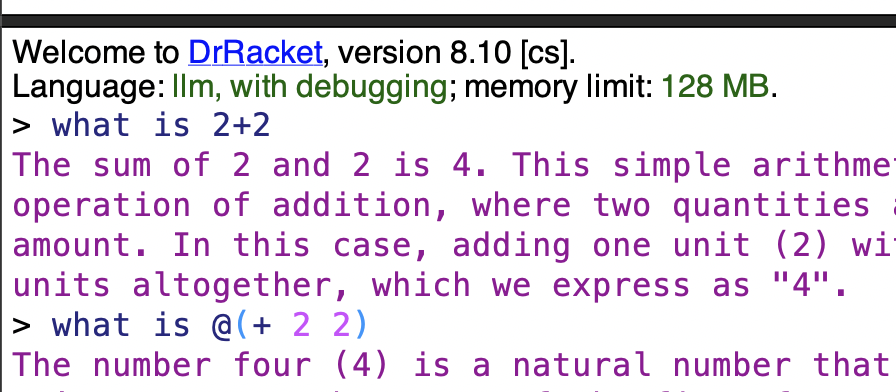
The at-exp reader is also used in the REPL, and the unprompt form is also recognized there. Multiple unstructured datums can be written in the REPL, which are collected into a prompt. For example, entering What is 2+2? in llm lang REPL will send the prompt "What is 2+2?". Any unprompted values in the REPL are returned as multiple return values, and displayed using the current-print handler. For example, entering @(unprompt 5) @(unprompt 6) at the REPL returns the values (values 5 6) to the REPL.
llm lang redefines the current-print handler display all values, except (void). Since the primary mode of interaction is a dialogue with an LLM, this makes reading the response easier.
By default, the resource cost in terms of power, carbon, and water of each request is estimated and logged, and reported to the logger llm-lang-logger with contextualizing information, to help developers understand the resource usage of their prompts. This data, in raw form, is also available through current-carbon-use, current-power-use, and current-water-use.
> (require llm llm/ollama/phi3 with-cache)
> (parameterize ([*use-cache?* #f]) (with-logging-to-port (current-error-port) (lambda () (prompt! "What is 2+2? Give only the answwer without explanation.")) #:logger llm-lang-logger 'info 'llm-lang))
llm-lang: Cumulative Query Session Costs
┌──────────┬─────────────┬─────────┐
│Power (Wh)│Carbon (gCO2)│Water (L)│
├──────────┼─────────────┼─────────┤
│0.064 │0.012 │0 │
└──────────┴─────────────┴─────────┘
One-time Training Costs
┌───────────┬─────────────┬─────────┐
│Power (MWh)│Carbon (tCO2)│Water (L)│
├───────────┼─────────────┼─────────┤
│6.8 │2.7 │3,700 │
└───────────┴─────────────┴─────────┘
References Resource Usage, for Context
┌─────────────────────────────────┬───────┬──────────┬──────────────┐
│Reference │Power │Carbon │Water │
├─────────────────────────────────┼───────┼──────────┼──────────────┤
│1 US Household (annual) │10MWh │48tCO2 │1,100L │
├─────────────────────────────────┼───────┼──────────┼──────────────┤
│1 JFK -> LHR Flight │ │59tCO2 │ │
├─────────────────────────────────┼───────┼──────────┼──────────────┤
│1 Avg. Natural Gas Plant (annual)│-190GWh│81,000tCO2│2,000,000,000L│
├─────────────────────────────────┼───────┼──────────┼──────────────┤
│US per capita (annual) │77MWh │15tCO2 │1,500,000L │
└─────────────────────────────────┴───────┴──────────┴──────────────┘
"4"
The cost is logged each time a prompt is actually sent, and not when a cached response to replayed. The costs are pretty rough estimates; see LLM Cost Model for more details.
#lang scribble/base @(require llm llm/ollama/phi3) @title{My cool paper} @prompt!{ Write a concise motivation and introduction to the problem of first-class prompt-engineering. Make sure to use plenty of hyperbole to motivate investors to give me millions of dollars for a solution to a non-existant problem. }
#lang llm @(require llm/define racket/function) @(require (for-syntax llm/openai/gpt4o-mini)) @; I happen to know GPT4 believes this function exists. @(define log10 (curryr log 10)) @define-by-prompt![round-to-n]{ Define a Racket function `round-to-n` that rounds a given number to a given number of significant digits. } @(displayln (round-to-n 5.0123123 3))
By default, llm lang modifies the current-read-interaction, so you can continue talking to your LLM at the REPL: